Get 50% off Weafbooks for your first 6 months*

See plans

Run the whole business from one place

Sales, inventory, accounting, HR and customers — together, in real time, across every branch, with the revenue authority filed as you sell.

Free to try. No card needed to start.

Features

Everything you need to grow

The tools a growing business actually reaches for, built to work together rather than side by side.

Real-time analytics

See how the business is doing as it happens, with dashboards and reports that go as deep as you need.

Inventory management

Track stock across every warehouse, with alerts before you run out and forecasting for what to order next.

Point of sale

A fast, dependable till with flexible payment options and every transaction accounted for.

Customer management

Full profiles and purchase history, so the person at the counter is more than a name on a receipt.

Sales optimisation

Recommendations and a pipeline view that show where the next shilling of revenue is going to come from.

Enterprise security

Role-based permissions on every screen and every API call, encrypted integration credentials, and an audit trail of who did what, and when.

One system

Every part of the business, in one place

Nothing here is an add-on you have to bolt on later — it is one system, and these are its parts.

Sales & POS

Point of sale with inventory sync, customer records and real-time reporting.

Inventory

Stock control across warehouses, with automated alerts and live tracking.

Accounting & finance

Chart of accounts, journal entries, financial reporting and audit trails.

HR & payroll

Employee records, payroll runs, attendance and leave management.

Purchasing

Suppliers, purchase orders, returns and automated procurement workflows.

Multi-currency

Live conversion and multi-currency transactions for businesses that trade abroad.

E-commerce

An online store that shares your stock and pulls orders straight in.

Business intelligence

Analytics, custom dashboards and forecasting to decide on evidence.

Multi-branch

Central control of every location, with unified reporting and stock transfers.

EFRIS & MRA

Fiscalisation and VAT compliance handled for Uganda and Malawi.

Security & audit

Encryption, role-based permissions and a complete audit trail.

Mobile access

Your business data on the phone in your pocket, online or off.

API integration

Connect third-party apps, payment gateways and anything you have built yourself.

CRM

Contacts, sales pipeline and the marketing tools that sit alongside them.

Manufacturing

Production planning, work orders, quality control and manufacturing analytics.

Service management

Scheduling, work orders, technician tracking and service analytics.

Payments

Integrated gateways, cash drawer management and reconciliation.

Email

Automated notifications, customer communications and campaigns.

Reporting

Custom reports, financial statements and performance dashboards.

Workflows

Approval processes and business rules you define once and forget.

Stock transfers

Inter-branch transfers, adjustments and warehouse management.

Quotations

Quote, convert to invoice, and keep both in step from then on.

Tax integrations

Filed with the revenue authority as you sell

Fiscalisation is part of the invoice, not a separate errand at the end of the month. Raise the sale once and the fiscal receipt, the credit note and the stock movement all go where the law says they should.

Uganda — EFRIS

Live

Uganda Revenue Authority. Invoices, credit notes, goods in and out, and the QR-coded fiscal receipt printed straight off the order — with the FDN and verification code on the printout.

Malawi — MRA

Live

Malawi Revenue Authority EIS. Terminal activation, fiscal receipts, credit notes and stock declarations, with MRA receipt identifiers carried onto the printed invoice.

Zambia — Smart Invoice

In build

ZRA Smart Invoice. The module is in the plan list and the invoice pipeline it needs is already shared with EFRIS and MRA.

More countries are being added, and the fiscal pipeline is written once and reused, so a new authority is a connector rather than a rebuild. Tell us which one you need — that is largely how the order gets decided.

Apps connected

It works with what you already run

Your accountant keeps their books, your reps keep their phones, your customers keep their shop front. Weafbooks sits behind all three.

QuickBooks Online

Live

Two-way sync of customers, suppliers, items, invoices, bills and payments. Edit either side; the later edit wins. Manual, scheduled or as-it-happens.

Weafbooks mobile

Live

Android app on Google Play. Sell, check stock and read the day’s figures with no connection, and let it catch up when there is one.

Route Sales app

Live

The van-sales half of the same app: today’s route, the customers on it, GPS check-ins and a sale raised at the customer’s door.

Online store

Live

A branch storefront that shares your catalogue, prices and live stock, and drops its orders straight into the same sales list.

Open API

Live

Token-authenticated endpoints behind the same permissions as the screens, for the payment gateway or in-house tool you already depend on.

Zoho Books & Sera ERP

In build

Next on the connector list, built on the same mapping layer that QuickBooks Online already runs on.

Route Sales app

The van is a branch that moves

Load the vehicle, work the route, sell at the door and settle at the end of the day — with the stock on board and the cash collected both accounted for before the driver goes home.

Routes that repeat themselves

Build a beat once — the shops, the day of the week, the rep, the vehicle — and it comes back every cycle without anyone rebuilding it.

Visits you can prove

Each call is checked in against the customer’s own coordinates, with photos and notes attached, so a visit is a record rather than a claim.

Sell at the door

The order, the receipt and the payment are raised on the phone at the customer, against the van’s own stock, offline if the signal has gone.

Customers found for you

Nearby-customer lookup surfaces the shops around the rep that are not on today’s beat, so an empty half-hour turns into a call.

The day, reconciled

Route sales reports drill from the region to the rep to the single receipt, and export to PDF or Excel for whoever signs it off.

Regions, locations, territories

Group customers the way the sales team already talks about them, and read performance back at exactly that level.
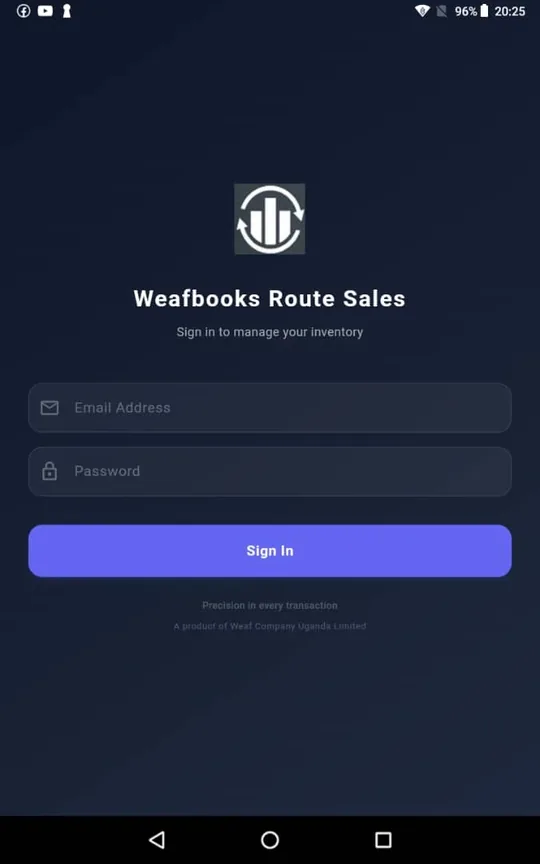
Weafbooks Route Sales app: Sign in. On the phone or tablet the rep already carries, against the branch they are selling out of.
Sign in On the phone or tablet the rep already carries, against the branch they are selling out of.
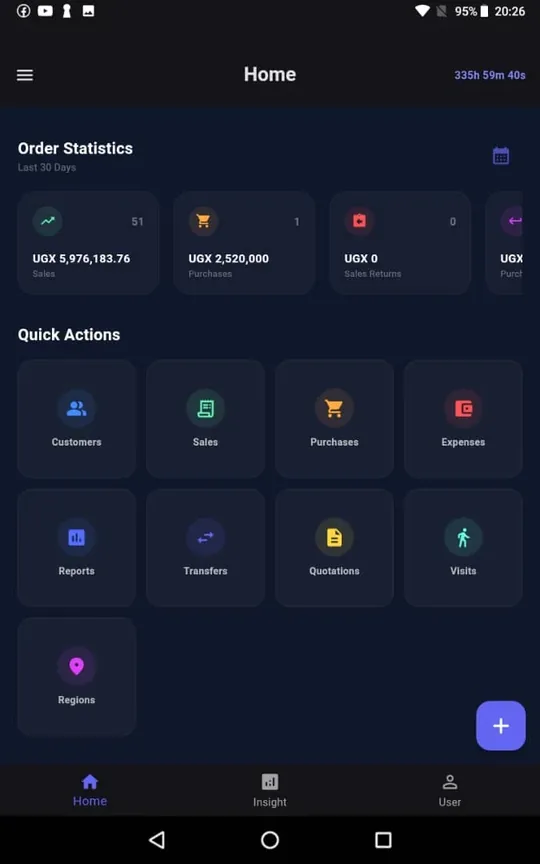
Weafbooks Route Sales app: The day so far. Sales, purchases and returns for the last 30 days, with every action one tap away.
The day so far Sales, purchases and returns for the last 30 days, with every action one tap away.
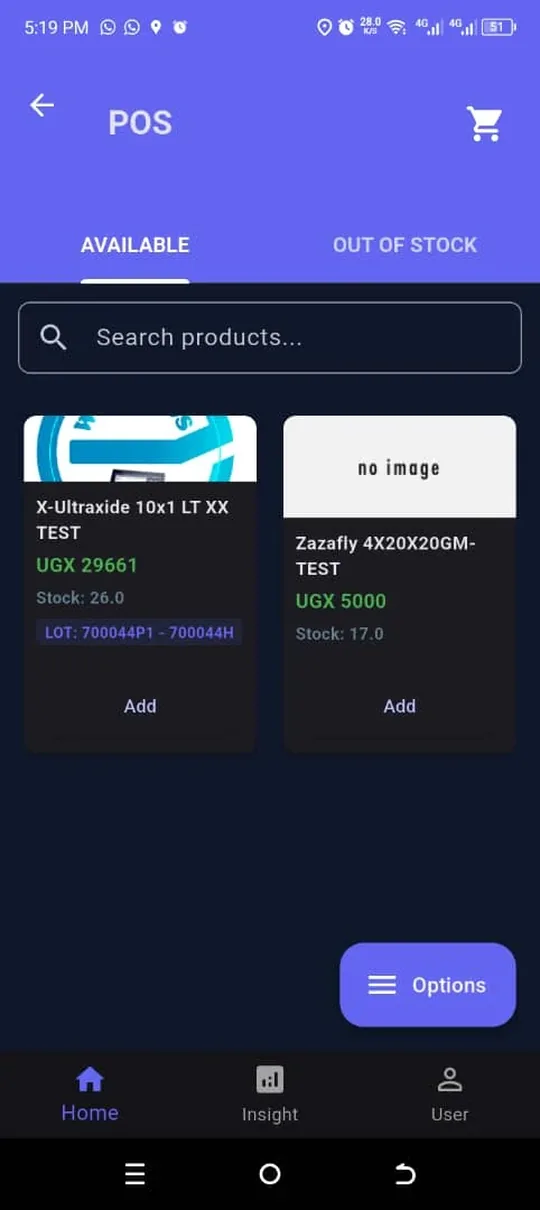
Weafbooks Route Sales app: What is on the van. The stock actually on board, with its batch numbers, searchable and priced.
What is on the van The stock actually on board, with its batch numbers, searchable and priced.
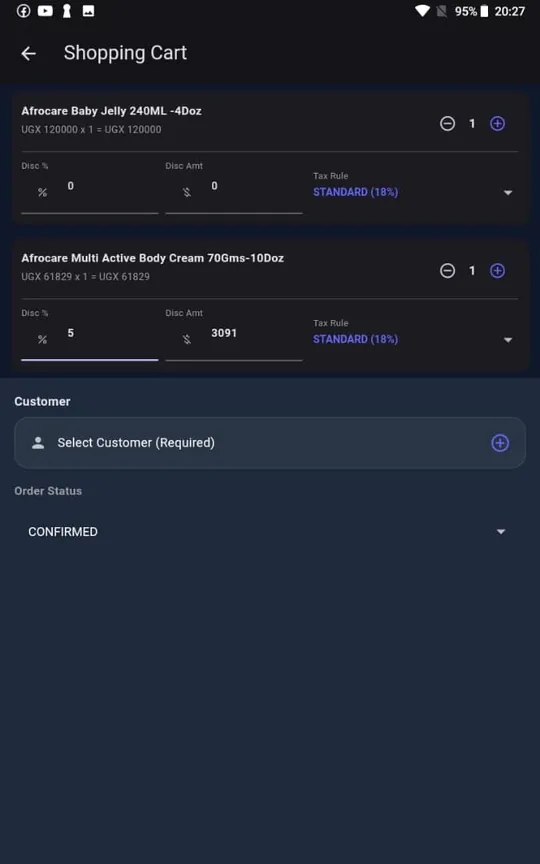
Weafbooks Route Sales app: Build the order. Line discounts and the right tax rule applied while the customer watches.
Build the order Line discounts and the right tax rule applied while the customer watches.
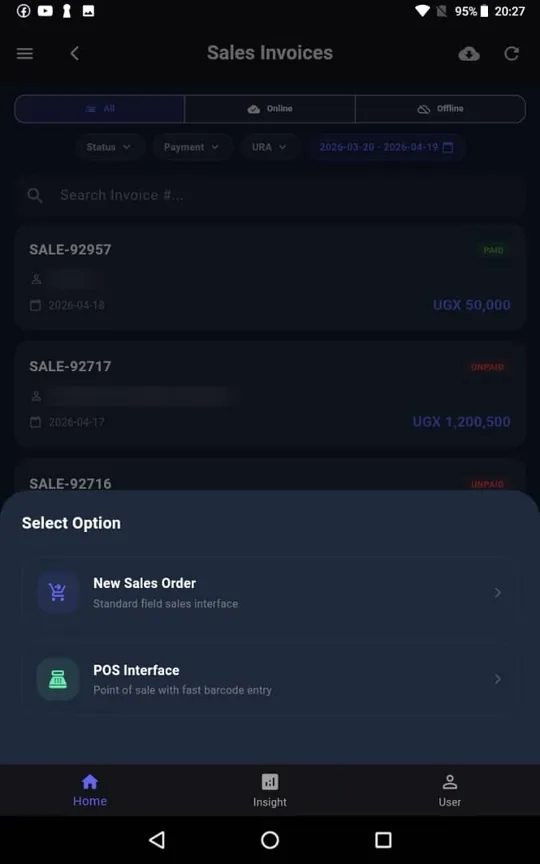
Weafbooks Route Sales app: Every invoice. Filtered by whether it has reached the server yet - online, offline, or both.
Every invoice Filtered by whether it has reached the server yet - online, offline, or both.
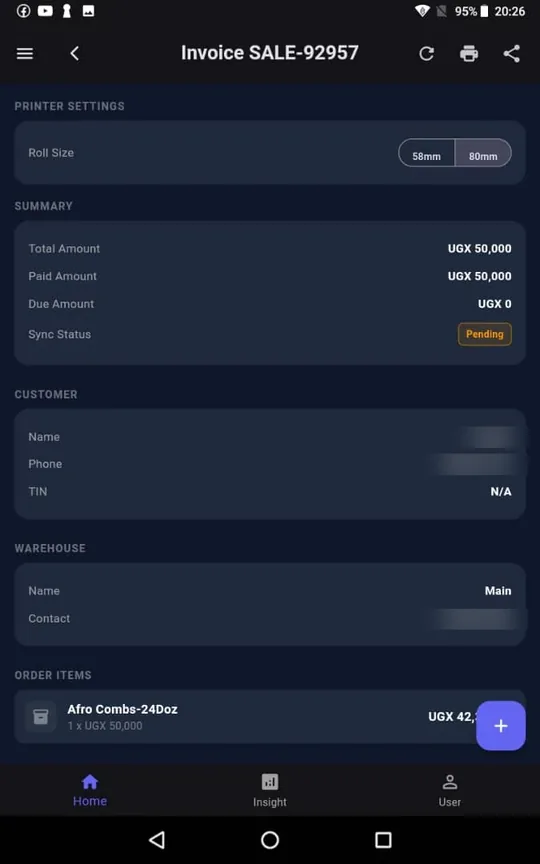
Weafbooks Route Sales app: Proof it landed. A sale raised at the door stays marked pending until the signal comes back.
Proof it landed A sale raised at the door stays marked pending until the signal comes back.

Screens from the live app. Customer names and numbers are blurred — they belong to a real business.

Mobile app

Take the business with you

The full system in your pocket. Built to keep you in control whether you are at the counter, on the road, or nowhere near a signal.

Who it is for

Built for how you actually work

The same system, set up differently depending on what you sell and how you sell it.

Retail & wholesale

A fast till, stock that stays honest across branches, and prices you can see the margin on before you agree to them.

Manufacturing

Production planning, work orders and quality control, with the cost of every finished unit carried through to the accounts.

Services & consulting

Quotations, scheduling, work orders and billable time, kept in step with the ledger rather than a spreadsheet.

See all the benefits
Questions

The things people ask first

How long does it take to get started?

An afternoon for most businesses. You can import your products, customers and opening stock from a spreadsheet rather than typing them in, and you can start with one branch and add the rest later.

Do I have to pay before I can see it?

No. Every plan can be tried first, no card required. Load a week of your own sales into it — that answers more than any feature list can.

Does it handle EFRIS and MRA properly?

Yes, and not as an afterthought. Fiscalisation is part of raising the invoice: the fiscal receipt, the credit note and the stock declaration all follow from the sale you already entered. Uganda (EFRIS) and Malawi (MRA) are live; Zambia is in build.

Can my accountant keep using QuickBooks?

Yes. Customers, suppliers, items, invoices, bills and payments sync both ways with QuickBooks Online. Edit either side; the later edit wins. Run it manually, on a schedule, or as changes happen.

What happens when the internet goes down?

The mobile app keeps selling and keeps tracking stock with no connection, and syncs when it gets one. That is the point of it, not a fallback.

Is my data safe, and is it really mine?

It is yours, we never sell it, and it leaves the system only for the revenue authority you file with and the apps you connect yourself. It is mirrored to a second server in another country and backed up on top of that. The whole of it is written down on the Security and your data page.

There are more on the full FAQ, and if yours is not there, just ask us.

Your data

It stays yours

You are handing over your customers, your prices and your margins. Here is exactly what happens to them — and what never does.

We never sell it

Not to advertisers, not to data brokers, not to anyone. Your business data is not a product we have, and it is not used to build one.

Only where you send it

It leaves the system in two cases, both yours to switch on: the fiscal documents you file with your revenue authority, and an app you connect yourself, such as QuickBooks.

Your staff see their part

Permissions are set per role and apply to every screen and every API call alike. A cashier does not get the margin report because nobody remembered to hide it.

Every change has a name on it

Who edited the invoice, when, and what it said before. An audit trail is not a feature you turn on here — it is how the ledger is kept.

A second copy, kept current

The database is mirrored to a separate server in a different country, and backed up on top of that, so a lost machine is an inconvenience rather than the end of your records.

You can take it and go

Export any report to PDF or Excel whenever you like, and ask us for a full copy of your data. Leaving is your decision, and it is not made difficult.

The whole of it is written down, in plain words: Security & your data, Privacy policy and Terms of service. If something there is unclear, that is worth telling us about.

Ready when you are

Move onto WEAF at your own pace. Set-up takes an afternoon, not a quarter, and you can try the whole thing before you pay for any of it.

Start your free trial